A Built-for-Speed Chrome Authenticator
Manage dozens of 2FA tokens without clutter or accounts. Add accounts by dropping a QR screenshot, filter instantly with live search, monitor 30s or 60s countdown rings, and click once to copy your OTP straight into any Chrome tab.
Secure TOTP Authenticator is an independent browser extension developed by GreeLogix. It is not affiliated with, endorsed by, or officially connected to Google or Google Authenticator.
What a Browser Authenticator Extension Does—and How Management Works
Secure TOTP turns your Chrome toolbar into a self-contained TOTP vault with clean UX built for everyday developer, SaaS, and agency workflows.
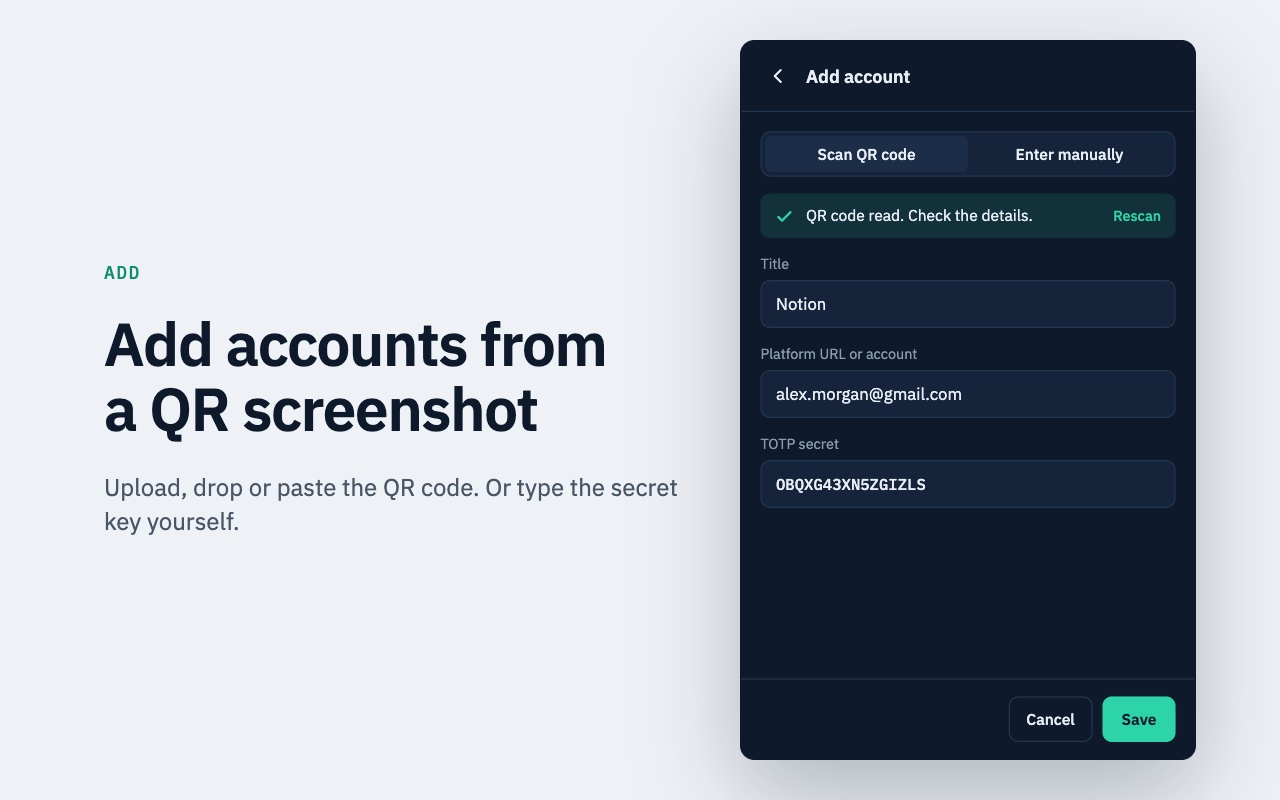
Upload, Drag or Paste QR Screenshots
Skip phone cameras entirely. Drag, upload, or paste a 2FA QR screenshot right into Chrome, or enter Base32 secrets manually.
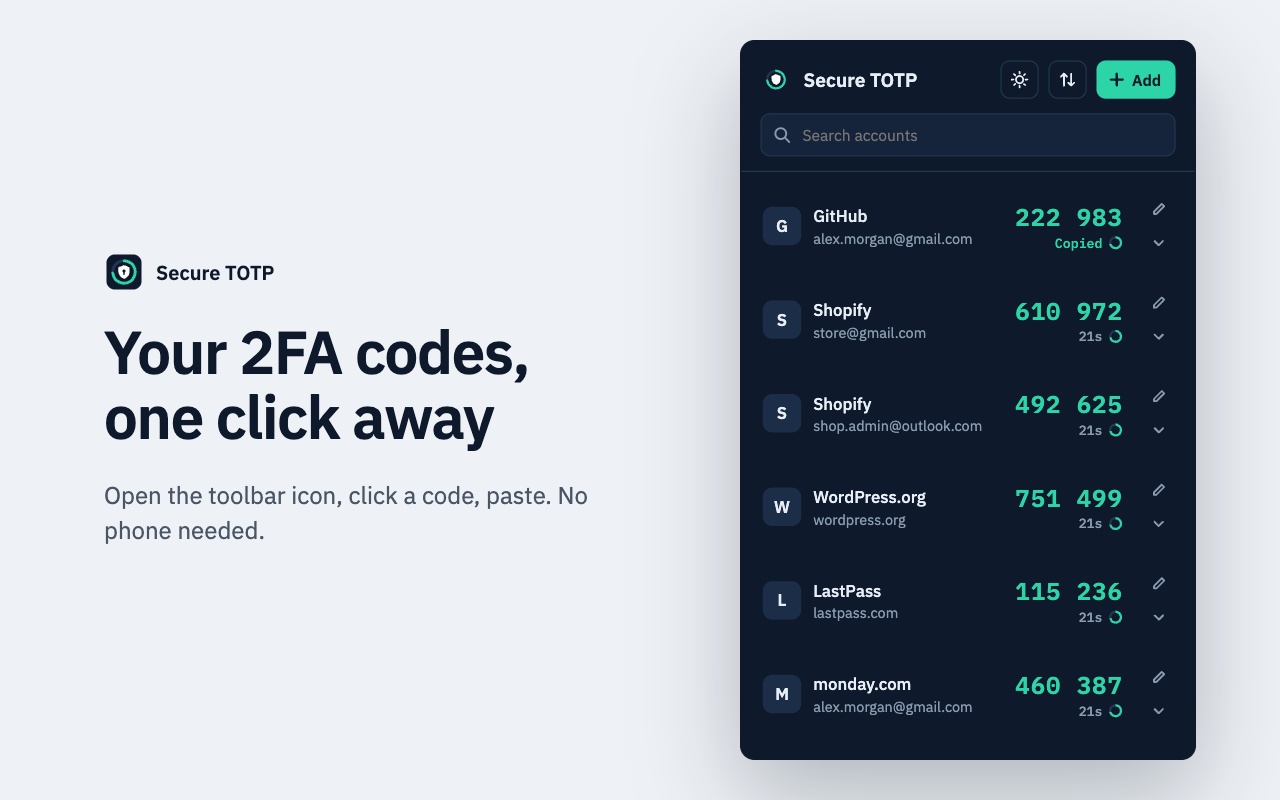
One-Click Code Copying
Click any active code row to place the 6- or 8-digit token in your clipboard with instant 'Copied' visual feedback.
Search & Filter Accounts
Instantly locate matching issuer names or account emails across large work and client portfolios.
Visual Countdown Timer
Each token displays remaining validity seconds cleanly so you avoid pasting expired codes mid-submission.
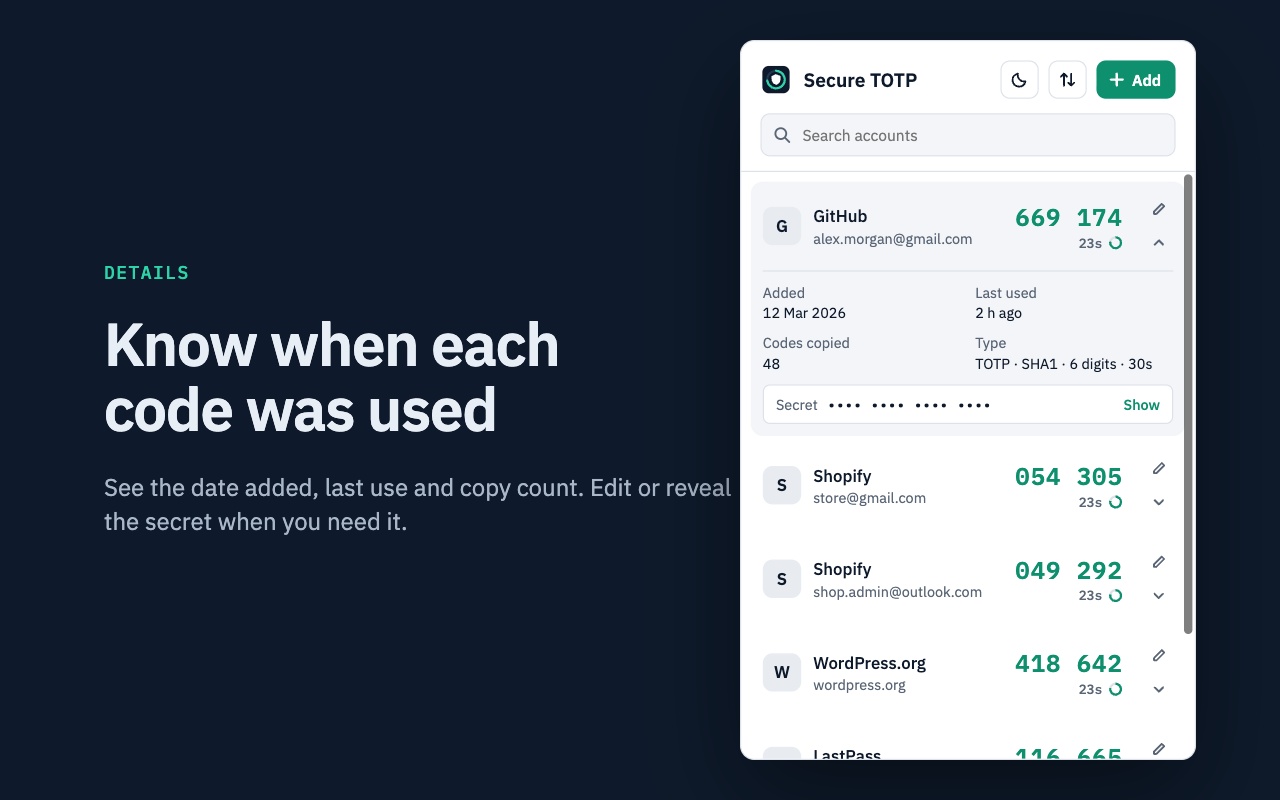
Edit Labels & View Usage History
Rename messy issuer labels, check added dates, last-used timestamps, copy counters, and underlying TOTP parameters.
Show/Hide Secret Inspection
Keep saved Base32 secrets masked by default and reveal a key intentionally only when transferring to a secondary app.
Browser Authenticator vs. Mobile Phone Authenticator
Understanding the practical workflow and risk differences helps you choose the right setup—or pair both intentionally.
| Factor | Chrome Extension (Secure TOTP) | Smartphone Authenticator App |
|---|---|---|
| Speed at Desk | Instant toolbar open + one-click clipboard copy | Unlock phone, locate app, manually re-type 6 digits |
| Device Isolation | Shares your computer OS/browser boundary—requires strong PC hygiene | Physically separate device from desktop browser sessions |
| Offline Operation | Computes codes 100% offline using device clock | Computes codes 100% offline using phone clock |
| Account Import & Export | QR upload, Google Authenticator import, password-encrypted `.json` export | Camera scan; backup behavior varies by vendor (cloud sync vs QR transfer) |
| Supported Standards | RFC 6238 TOTP (SHA-1/256/512, 6/8 digits, 30s/60s) | Typically TOTP SHA-1 (some mobile apps ignore SHA-256/8-digit or HOTP) |
Export a transfer QR code from Google Authenticator and copy selected work tokens into Chrome without deleting mobile access.

Generate 2FA Codes Directly in Chrome
Offline TOTP code generation, one-click copying, Google Authenticator QR import, and encrypted JSON backups—without creating a cloud account.
Frequently Asked Questions
Direct answers covering compatibility, security boundaries, offline behavior, and backups.
Related Secure TOTP Guides & Resources
Explore specialized guides on desktop 2FA, offline TOTP generation, and backup security.
Extension Workflows & Compatibility
Generate 2FA codes inside Chrome and import selected accounts from Google Authenticator transfer QR codes without removing them from your phone.
Run an RFC 6238 desktop authenticator inside Chrome on Windows, macOS, or Linux with fast search, one-click copying, and computer security best practices.
Deep technical breakdown of SHA-1, SHA-256, and SHA-512 TOTP calculation, 6/8-digit code formatting, 30s/60s time windows, and local execution.
2FA & TOTP Educational Guides
Understand what TOTP means, how shared secrets sync with Unix time windows, why codes expire, and why TOTP beats static passwords.
Walk through exporting transfer QR codes from Google Authenticator, importing selected tokens into Secure TOTP, and keeping phone copies intact.
An objective threat-model review covering local storage, OS disk encryption, malware exposure, single-device risk, and recovery code hygiene.
A clear foundation on authentication factors (knowledge, possession, inherence) and why app-based OTPs outperform SMS.
Streamline Your Browser 2FA Logins Today
Install Secure TOTP Authenticator free from the Chrome Web Store.
Add to Chrome — Free